
Amote5.7 - Get APK
You'll be able to download in few seconds.
Publisher Description
Important! This app needs a running LIRC server on a Windows or Linux system and you will probably also need special hardware for sending the infrared commands. I would recommend using the Irdroid Wifi system that works out the box with AMOTE (find it here http://www.irdroid.com/irdroid-wifi-version-3-0/) or built your own system using a Raspberry Pi and a simple DIY transmitter like this one http://www.datscharf.dk/amote/hardware/diy-transmitter/.
AMOTE Free is a client for LIRC (the Linux Infrared Remote Control). Connect an infrared transmitter/blaster to your server running LIRC, create or download a remote control configuration file from http://lirc.sourceforge.net/remotes/. And you are ready to build your own network based Universal Remote control out of your tablet or phone.
For an ad-free experience buy AMOTE Pro.
Need help? Found a bug or have some ideas to share either contact me at datscharf@gmail.com or visit www.datscharf.dk/amote.
Features
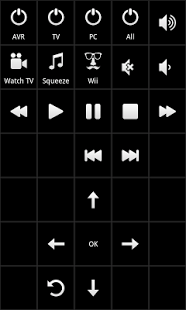
- Use colors to design your own remote. Select different colors for buttons, grid, icons, symbols and texts.
- Macro support. Create favorite keys that issues multiple infrared commands from one or more LIRC servers. For example create a key that turns off the tv in your living room and in your bed room at the same time.
- Supports repeat on long press both real and emulated
- Support simulated events, make LIRC server pretend it received the event over IR
- Password protection on startup and/or on resume.
- Hide statusbar and lock in portrait mode
- Slide between views
- 4 button home screen widget with your four most used favorite buttons (macros are also supported).
- Increasing the size of the layout will preserve the configuration you have already done.
- Use icons, text and symbols for each button
- Configurable number of coloumns and rows and up to 10 different favorite remote-pages
- Different layout depending on screen orientation
- Should work with any standard LIRC server including WinLIRC
- Tested on Android versions 1.6 to 4.1
- You will get future updates. AMOTE is always a work in progress and there are additional features in the works.
About Amote
The company that develops Amote is datscharf. The latest version released by its developer is 5.7.
To install Amote on your Android device, just click the green Continue To App button above to start the installation process. The app is listed on our website since 2014-10-20 and was downloaded 0 times. We have already checked if the download link is safe, however for your own protection we recommend that you scan the downloaded app with your antivirus. Your antivirus may detect the Amote as malware as malware if the download link to com.datscharf is broken.
How to install Amote on your Android device:
- Click on the Continue To App button on our website. This will redirect you to Google Play.
- Once the Amote is shown in the Google Play listing of your Android device, you can start its download and installation. Tap on the Install button located below the search bar and to the right of the app icon.
- A pop-up window with the permissions required by Amote will be shown. Click on Accept to continue the process.
- Amote will be downloaded onto your device, displaying a progress. Once the download completes, the installation will start and you'll get a notification after the installation is finished.
Program Details
System requirements
Download information
Pricing
Version History
version 5.7
posted on 2014-10-20
version 2.0
posted on 2013-06-11
Several fixes and updates
Disclaimer
External Download
We do not host Amote on our servers. We did not scan it for viruses, adware, spyware or other type of malware. This app is hosted by Galad and passed their terms and conditions to be listed there. We recommend caution when installing it.
The APK Download link for Amote is provided to you by apps112.com without any warranties, representations or guarantees of any kind, so access it at your own risk.
If you have questions regarding this particular app contact the publisher directly. For questions about the functionalities of apps112.com contact us.
